
WhatsApp that answers, tags and follows up for you
Build WhatsApp automations without code: welcome first-time customers, reply to keywords, send buttons and lists, wait and follow up, and let Jenny, your AI rep, answer the real questions and book appointments.
What you can automate on WhatsApp
Everything you need to automate, scale, and convert customers effortlessly.
Keyword Auto-Replies
Reply the moment a message mentions a word like "price", "menu" or "book". Matching ignores capitals, so "Price?" counts too.
Welcome & Out-Of-Hours Messages
Greet first-time customers automatically, and send an away message only between the hours you choose.
Buttons, Lists & Chat Flows
Send reply buttons or a list menu, then start a different automation for each option the customer taps.
Waits & Follow-Ups
Wait minutes, hours or days, then send the next step. For a follow-up after 24 hours, add a Meta-approved template step.
AI Replies Inside A Flow
Add an AI reply step and Jenny answers the customer's actual question from your prices and policies, and can book the appointment.
Tags, Fields & Deals
Tag a contact, update a custom field or open a deal in your pipeline, so hot leads don't get lost in the chat list.
How WhatsApp automation works in Darvix
- 1
Connect your number
Connect your WhatsApp Business number through Meta's official signup popup. Messages start arriving in your Darvix inbox.
- 2
Pick a trigger
First message from a new customer, any new message, a keyword, a button or list tap, a new contact, a tag being added or a form being submitted.
- 3
Add the steps
Send a message, template, buttons, list or product cards, hand the question to Jenny, send an email, tag the contact, wait, or branch on time of day, a tag or a custom field.
- 4
Turn it on and watch the log
Every run is logged, so you can see which automations fired, for whom, and whether each step worked.
Start from a ready-made recipe (Welcome Message, Out of Office, Lead Qualifier or Follow-up Reminder) and edit it, or build your own. Automations run on Instagram DMs too; see Instagram automation.
Rules for the predictable, Jenny for the rest.
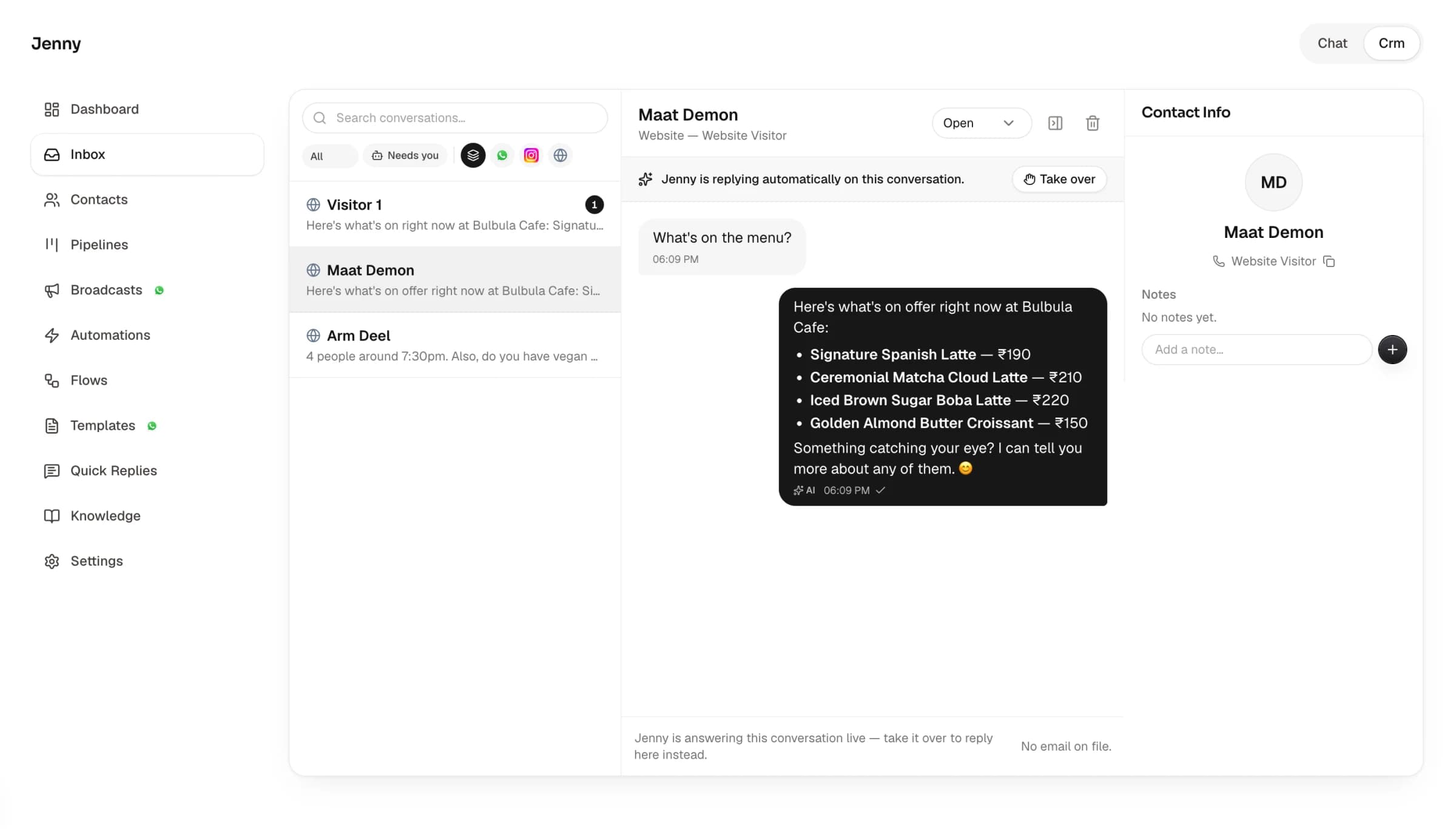
Automations handle the messages you can predict: greetings, keywords, menus and follow-ups. When a customer asks something a rule can't cover, an AI reply step passes it to Jenny, who answers from what you've taught her and hands the chat to you if she can't help.
- Every sender becomes a contact in your CRM
- Form leads can get a WhatsApp template from the phone number they gave
- Chats Jenny can't handle move to your "Needs you" list
WhatsApp Business app vs Darvix automation
Frequently Asked Questions
Everything you need to know about the platform and setup process.
What is WhatsApp automation?
It's sending WhatsApp replies and follow-ups automatically when something happens, such as a first message, a keyword or a button tap. In Darvix you build automations from a trigger and a list of steps, with no code, and can hand any question to Jenny, the AI rep.
Do I need the WhatsApp Business API for automation?
Yes. Automations use WhatsApp's official Business API, which Darvix connects through Meta's signup popup. Connecting moves the number to the API, so you answer it from Darvix instead of the WhatsApp Business app.
Can I send automated follow-ups after 24 hours?
WhatsApp only allows free-form messages within 24 hours of the customer's last message. For a later follow-up, use a template step with a Meta-approved template, which you can create in Darvix.
Does Darvix charge per automated WhatsApp message?
No. Meta bills its own WhatsApp fees to your WhatsApp Business account, and Darvix doesn't add a per-message charge. AI reply steps use a small number of AI credits from your plan.
Can a WhatsApp automation book appointments?
Yes. Add an AI reply step and Jenny can check your availability and book, reschedule or cancel the appointment inside the chat.

Put your WhatsApp replies on autopilot
Connect your number, pick a recipe and switch it on.